Search

Tuesday, April 28, 2009

Finalizers and Thread local storage

Sunset from our balcony

Writing finalizers is generally tricky. In the msdn documentation for finalizers the following limitations are mentioned.

  1. The exact time when the finalizer executes during garbage collection is undefined
  2. The finalizers of two objects are not guaranteed to run in any specific order
  3. The thread on which the finalizer is run is unspecified.
  4. Finalizers might not be run at all

#3 has interesting consequences. If a native resources is allocated by a managed ctor (or any other method) and the finalizers is used to de-allocate that then the allocation and de-allocation will not happen on the same thread. The reason being that the CLR uses one (maybe more than one) special thread to run all finalizers on. This is easily verified by the fact that if you query for the thread id inside the finalizers you will get a different id than the main thread the application is being run on.

The thread safety is generally easy to handle but might lead to some tricky and hard to locate problems. Consider the following code

class MyClass
{
public MyClass()
{
tls = 42;
Console.WriteLine("Ctor threadid = {0} TLS={1}", AppDomain.GetCurrentThreadId(), tls);
}

~MyClass()
{
Console.WriteLine("Finalizer threadid = {0} TLS={1}", AppDomain.GetCurrentThreadId(), tls);
}

public void DoWork()
{
Console.WriteLine("DoWork threadid = {0} TLS={1}", AppDomain.GetCurrentThreadId(), tls);
}

[ThreadStatic]
static int tls;
}

class Program
{
static void Main(string[] args)
{
MyClass mc = new MyClass();
mc.DoWork();
mc = null;
GC.Collect();
GC.WaitForPendingFinalizers();
}
}

Here we create a class, use it and finalize it. In all of these 3 methods we print the thread id and also use a special variable named tls.


If you see the tls is marked with the attribute ThreadStatic. The definition of ThreadStatic is “Indicates that the value of a static field is unique for each thread”.


I hope by now you have figured out the gotcha :). Under the hood the CLR uses a native OS concept called Thread Local Usage (TLS) to ensure that the value of tls is unique per thread. TLS uses special per thread data-structure to store that data. Now we have set the value in the ctor and used it in finalizer. Since they run on different threads each will get different values of the same field.


On my system the out put is as follows

Ctor threadid = 5904 TLS=42
DoWork threadid = 5904 TLS=42
Finalizer threadid = 4220 TLS=0
Press any key to continue . . .

As is evident the finalizer ran on a different thread (id is different) and the TLS value is also different from what was set.


So the moral of this story is “Be careful about thread safety of finalizers and do not use thread local storage in it

Sunday, April 19, 2009

What post are you known for?

Charminar, Hyderabad

I was just listening to Scot Hanselman’s podcast where he interviews Joel. They talk about how most bloggers get known for one post. E.g. Joel is known for “The Absolute Minimum Every Software Developer Absolutely, Positively Must Know About Unicode and Character Sets (No Excuses!)”.

Now obviously I’m not a famous blogger and I’m not known for any post but the fact that my most read post is “How many (.NET) types are loaded for Hello World” makes me feel a bit weird. IMO that is one of the least useful posts I’ve ever written.

Thursday, April 16, 2009

.NET Code Pitching

Raiding dads office

The word pitch can have many meanings, but in case of the code pitching it is used in the sense of “to throw away”.

The desktop CLR never throws away or pitches native code that it JITs. However, the .NET Compact Framework CLR supports code pitching due to the following reasons

  1. It is targeted towards embedded/mobile systems and therefore needs to be more sensitive towards memory usage. So in some situations it throws away JITed code to free up memory.
  2. NETCF runs on RISC processors like ARM where code density is lower than that of x86. This means the JITed native code is larger in size for a given set of IL on say ARM vs that on say x86. Due to this the memory usage overhead is a bit aggravated. However, this isn’t really a primary motivator and there are other work around like using the newer ARM instruction set extensions.

Code pitching can happen due to various reasons like (note this is not an exhaustive list)

  1. When the managed application gets WM_HIBERNATE message it fires a round of garbage collection and also pitches code
  2. When the JITer fails to allocate memory it attempts code pitching to free up memory and re-tries allocation
  3. Other native resource allocation failures also initiates pitching

Obviously code pitching has performance implications and can result in the same method being pitched multiple times. You can monitor code pitching in Remote Performance Monitor.

image

As the name suggests the GC does drive code pitching but they are not essentially related. E.g. if user code forces GC by System.GC.Collect() code pitching is not done. Code pitching is primarily driven by real low memory scenarios.

Caveat: While pitching the CLR ensures that it doesn’t throw away any JITed method on the current managed execution stack. No points for guessing why that is important.

Tuesday, April 14, 2009

Multiple calls to GC.ReRegisterForFinalize

Holi Celebration at our appartment complex

What happens when there are multiple calls to GC.ReRegisterForFinalize for the same object?

Consider the following C# code

class MyClass
{
~MyClass()
{
Console.WriteLine("~MyClass");
}
}

class Program
{
static void Main(string[] args)
{
MyClass mc = new MyClass();
GC.ReRegisterForFinalize(mc); // 1
GC.ReRegisterForFinalize(mc); // 2
GC.ReRegisterForFinalize(mc); // 3

GC.Collect();
GC.WaitForPendingFinalizers();
}
}

Here for the same object we have called GC.ReRegisterForFinalize thrice.


This is one of the few cases where the behavior of .NET and .NET Compact Framework differs.


In case of .NET the MyClass finalizer is called 4 times. Since the object has a finalizer, it is anyway finalized once and for the additional 3 calls to re-register it is finalized 3 more times.


In case of .NET Compact Framework the finalizer is called only once. The reason being internally finalizable is just a bool flag. Each time GC.SuppressFinalize is called it is set to false and each time GC.ReRegisterForFinalize is called it is set to true. So multiple calls doesn’t have any effect.


Hopefully this is one piece of information which none of my readers ever find useful, but since I got a bug assigned for the difference in behavior I might as well let folks know.

Monday, April 13, 2009

.NET Compact Framework MemMaker

2007_01_28 120
Glen recently discovered that by keeping his application’s EXE empty and putting all the forms, code, resources, and data in managed DLLs, he reduced the amount of virtual memory his app uses inside its slot while at the same time taking advantage of memory outside the slot in the 1 GB shared memory area

Read more about this very interesting finding at Rob Tiffany’s blog at http://blogs.msdn.com/robtiffany/archive/2009/04/09/memmaker-for-the-net-compact-framework.aspx

Sunday, April 12, 2009

Object Resurrection using GC.ReRegisterForFinalize

Fireworks

I have been thinking about writing this post for some time, but Easter weekend provided the right context to do so.

When I first encountered GC.ReRegisterForFinalize I was a bit baffled. The context help “Requests that the system call the finalizer for the specified object for which System.GC.SuppressFinalize(System.Object) has previously been called.” didn’t provide much clue as to why I would want to finalize an object more than once.

This is when I found out about object resurrection.

res·ur·rec·tion   (rěz'ə-rěk'shən)
-noun
  1. The act of rising from the dead or returning to life.
  2. The state of one who has returned to life.
  3. The act of bringing back to practice, notice, or use; revival.

This definition made perfect sense. The basic idea of using object resurrection is to handle scenarios where an object creation is very expensive for some reason (e.g. it makes system calls that take a lot of time or consumes a lot of resources). To avoid creating new objects and incur the creation cost again, you’d try to re-cycle older objects which have already done their job or in other words resurrect dead objects.

This can be done by using the following facts

  1. If an object is garbage (not-reachable) and has a finalizer, it is not collected in the first pass of the GC but is placed in the finalizer queue
  2. The finalizer thread calls the finalizers of each object in the finalizer queue and removes it from the queue.
  3. The next pass of the GC actually reclaims the object (as in de-allocate the memory)

In #2 above when the finalizer is executing if a new reference to the object is created and GC.ReRegisterForFinalize is called then the object becomes reachable and hence non garbage and so in #3 the GC will not reclaim it. Since GC.ReRegisterForFinalize is called, in the next cycle when the same object is available for collection #1 through #3 will again follow (so we set up the cycle).

Consider the scenario where MyClass is a class which is expensive to create. We want to setup a pool of these objects so that we can just pick up objects from this pool and once the object is done with, it is automatically put into that pool.

class MyClass
{
/// <summary>
/// Expensive class
/// </summary>
/// <param name="pool" />Pool from which the objects are picked up</param>

public MyClass(List pool)
{
Console.WriteLine("Expensive MyClass::ctor");
this.pool = pool; // Store the pool so we can use it later
}

public void DoWork()
{
Console.WriteLine("{0} Did some work", this.resurrectionCount);
}

/// <summary>
/// Finalizer method
/// </summary>

~MyClass()
{
resurrectionCount++;
// automatically return to the pool, makes this object reachable as well
pool.Add(this);

// Ensure next time this same finalizer is called again
GC.ReRegisterForFinalize(this);
}

private List<MyClass> pool;
private int resurrectionCount = 0;
}

// Create pool and add a bunch of these objects to the pool
List pool = new List();
pool.Add(new MyClass(pool));

// Client code
MyClass cl = pool[0]; // get the object at the head of the pool
pool.RemoveAt(0); // remove the object
cl.DoWork(); // start using it. Once done it will automatically go back to pool

At the start a bunch of these objects are created and put in this list of objects (taking a hit in startup time). Then as and when required they are removed from this list and put to work. Once the work is done they automatically get en-queued back to the pool as the finalizer call will ensure that.


Don’t do this


Even though the above mechanism seems pretty tempting, it is actually a very bad idea to really use this method. The major reason being that the CLR never guarantees when GC is run and post that when the finalizer will be run. So in effect even though a bunch of these objects have done their job it will be not be deterministic on when they will land up back in the queue.


If you really need to use object pooling a much better approach is to implement your special interface where you provide a method which is explicitly called by client code and is therefore deterministically controllable.

Monday, April 06, 2009

Technical Presentation Tip

Co-existance

I’m no Scot Hanselman, but even then I guess I can share at least one tip for delivering technical presentation that has worked very well for me.

At the very beginning of your presentation always have a slide clearly calling out what the attendees will “Take Away” and what is the “Pre-requisites'” of attending your presentation. Presentation titles sometime mislead and is generally not enough to indicate what a presentation is all about.

Benefits of calling out key take-away

  1. Helps you focus on what you want to convey and you can take feedback from the attendees on whether you met the expectation that you set.
  2. If an attendee feels he already knows about the topic or is not really interested for some other reason he can leave at the very beginning. No point wasting anyone’s time.
  3. You can direct discussion/questions. If someone tries venturing into an area you intentionally don’t want to cover you can get the discussion onto the right track. When I give my GC Theory talk I call out very clearly that the presentation is not about how either .NET or .NETCF implements GC and inevitably when someone ventures into some .NET implementation detail and I use this to get back to the main course.

Benefits of calling out pre-requisite

  1. Just like you need to ensure you are not wasting the attendees time by calling out take aways, you should ensure that you are not wasting your time trying to explain garbage collection to device driver programmers :)
  2. Explaining basic stuff to one attendee (who raises them) and wasting the time of all other attendees who already know the answer is not a good use of anyone’s time. _ASSERT on the pre-reqs and ensure that you are clear about what baseline knowledge you are expecting out of all the attendees.

You can learn more real presentation tips from Scot’s post and maybe then one day you’ll earn a feedback comment “The presentation was superb. I think this is the first presentation for which I was completely awake” and try to figure out who that one was ;)

Sunday, April 05, 2009

Floating point operations in .NET Compact Framework on WinCE+ARM

Holi Celebration at our appartment complex

There has been a some confusion on how .NETCF handles floating point operations. The major reason for this confusion is due to the fact that the answer differs across the platforms NETCF supports (e.g. S60/Xbox/Zune/WinCE). I made a post on this topic which is partially incorrect. As I followed that up I learnt a lot, especially from Brian Smith. Hopefully this post removes all the confusions floating around floating point handling in .NETCF on WinCE.

How does desktop CLR handle floating point operation

Consider the following floating point addition in C#

float a = 0.7F;
float b = 0.6F;
float c = a + b;

For this code the final assembly generated by CLR JITer on x86 platform is

            float a = 0.7F;
0000003f mov dword ptr [ebp-40h],3F333333h
float b = 0.6F;
00000046 mov dword ptr [ebp-44h],3F19999Ah
float c = a + b;
0000004d fld dword ptr [ebp-40h]
00000050 fadd dword ptr [ebp-44h]
00000053 fstp dword ptr [ebp-48h]

Here the JITter directly emits floating point instructions fld, fadd and fstp. It could do so because floating point unit and hence the floating point instructions are always available on x86.


Why does NETCF differ


Unfortunately NETCF targets a huge number of HW configs which vary across Xbox, Zune, WinCE on x86/MIPS/ARM/SH4, S60, etc.  There are even sub-flavors of these base configs (e.g. ARMv4, ARMv6, MIPS II, MIPS IV). On all of these platforms floating point unit (FPU) is not available.


This difference in FPU availability is taken care of by using different approaches on different platforms. This post is for WinCE+ARM and hence I’ll skip the other platforms.


Zune in a special WinCE platform


Zune is special because it is tied to a specific version of ARM with FPU built in (locked HW). NETCF on Zune was primarily targeted for XNA games and on games performance of floating point operation is critical. Hence the .NETCF JITer was updated to target ARM FPU. So for basic mathematical operation it emits inline native ARM FPU instructions very much like the desktop JITter shown above. The result is that the basic floating point operations are much faster.


WinCE in general


In general for WinCE on ARM, presence of FPU cannot be assumed because the least common subset targeted is ARMv4 which doesn’t essentially have a FPU.


To understand the implication it is important to understand that floating point operations can be basically classified into two categories:


  1. BCL System.Math operations like sin/cos/tan
  2. Simple floating point operations like +,/,- , *, conversion, comparison.

For the first category the JITer simply delegates the operation into WinCE by calling into CoreDll.dll, e.g. the sin, sinh, cos, cosh, etc.. available in CoreDll.dll.


For the second category the JITer calls into small worker functions implemented inside the NETCF CLR. These worker functions are native code and compiled for ARM. If we disassemble them we would see that for these the native ARM compiler emits calls into coredll.dll into say __imp___addd


It is evident from above that the performance of managed floating point operation is heavily dependent on whether the underlying WinCE uses the ARM FPU as in most scenarios floating point operations are finally delegated into it.


The whole thing can be summarized in the following table (courtesy Brian Smith)


WinCE6 + ARMv4i


WinCE6 + ARMv6_FP


#1 CE is NOT FPU optimized


#2 CE is FPU optimized


#3 CE is FPU optimized and so is NETCF (e.g. Zune JIT)


System.Math library calls


Delegated via pinvoke, emulated within CE (speed: slow)


Delegated via pinvoke, FPU instructions within CE (speed: medium)


Delegated via pinvoke, FPU instructions within CE (speed: medium)


FP IL opcodes (add, etc)


Delegated via JIT worker, emulated within CE (speed: slow)


Delegated via JIT worker, FPU instructions within CE (speed: medium)


FPU instructions inlined by JITed code (speed: fast)


#1 is the general case for NETCF + WinCE + ARM. #3 is the current scenario of NETCF + Zune + ARM.


#2 is based on the fact that WinCE 6.0 supports “pluggable” FP library. However, the NETCF team has not tried out this flavor and hence does not give any guidance on whether plugging in a FP library in WinCE will really have any performance improvement, however theoretically it does seems likely.


#3 today is only for Zune, but going forward it does seem likely that newer versions of WinCE will update it’s base supported HW spec, it will include FPU and then this feature will also make it to base NETCF for WinCE.

Monday, March 30, 2009

NETCF: Total Bytes in Use After GC – Perf counter

Holi (The festival of colors) celebration in full swing

At least one of our customers were a bit confused with the .NET Compact Framework performance counter “Total Bytes in Use After GC” which is described as “The number of bytes of memory, native and managed, in use after the last garbage collection.”. The description lead him to believe it is the total memory in use by a given managed application. That is not true.

The memory inside a .NET Compact Framework managed application can be broadly classified into

  1. Managed memory
  2. Jitted code
  3. Other native memory allocated by the CLR
  4. Native memory allocated by other sub-systems like say a COM module or some other native modules which the managed application P/Invokes into.

The first three is managed by .NET Compact Framework by using 5 heaps. The counter mentioned above returns the sum of all bytes allocated in all of the first 3 categories. .NETCF doesn’t keep tab of memory allocated in category #4.

Sunday, March 29, 2009

How many heaps does the .NET Compact framework use

Prokriti

While discussing the memory architecture with an internal customer, he inquired about how many heaps .NETCF creates. I’m not sure how it might be helpful to users, but the answer is 5. This has been touched upon in some blogs and presentations (e.g. MEDC 2005) but I thought I’d put up a handy list.

Heap Description
JIT heap This is the heap where the buffers of jitted code is placed. Unlike the desktop CLR under some circumstances the CLR does free jitted code by a processed named code-pitching (which I will cover in a later blog post)
GC heap This is where all the managed objects resides. The garbage collector is responsible for managing all objects on this heap including compacting it when it gets fragmented.
Short-term heap This is used for short-lived objects. E.g. while doing a number conversion for the System.Convert methods if temporary space is required by the underlying CLR native code then it is allocated from this heap only to be freed soon.
App-domain This is used by the CLR to place things like assembly meta-data, application/appdomain/thread state information.
Process heap This is the default heap where rest of the stuff goes in

Thursday, March 26, 2009

.NET Compact Framework and ARM FPU

Laad Bazaar Pearls, Charminar

One of our customers was porting an application on to .NETCF from native code and observed that on ARM v7 the floating point performance of .NET CF was way below that of native code. In particular he was trying out sine function. Their micro-benchmark showed that doing sine over couple of million times was 27 times slower in .NETCF as compared to native code.

The reason behind this is that native code targets the Floating Point Unit (FPU) when available. However, .NETCF targets the lowest common denominator of ARMV4i and doesn’t use FPU even when run on a higher ARM version where FPU is available. It actually uses SW emulation for floating point operations and hence is slower.

If floating point math performance is critical for your application then the way to address that would be to write the math operation in native code (a native dll) and P/Invoke into it.

However, the cost of making P/Invoke calls is high (~5-6x slower than normal method calls) and you need to ensure that it doesn’t offset the savings in using the FPU. A common way to do that is to use bulking and reduce chattiness of P/Invoke calls. E.g., if you are evaluating an expression of the form func(a) + func(b) + func(c) instead of creating a P/Invokable function func and calling it thrice, its best to put the whole expression inside the native dll and call that one function which does the whole operation. If it is possible you can even try to go one step ahead and pass a buffer of input and output and get the native dll to do all the operation and return the processed buffer in one go.

Trivia: The .NET Compact Framework that runs on the Zune (which uses ARM as well) does use the FPU on it. So we do have the support in code and hopefully at some point in the future it will make it to the main-stream .NET Compact Framework.

Random GC fun

Laad Bazaar, Charminar

A friend came by and asked “Dude, are you free”. I replied back cautiously “Why? Are you the Garbage Collector?”. I do not even implement a finalizer and hence wouldn’t even get some extra time standing in the finalizer queue. So I’m not taking any chance…

Monday, March 23, 2009

Dangers of large object heap

View of Charminar from inside Laad Bazaar, Hyderabad

Andrew Hunter has an interesting post on the issues with large object heap on the desktop CLR. Visit http://www.simple-talk.com/dotnet/.net-framework/the-dangers-of-the-large-object-heap/

Side Note: .NET Compact Framework doesn’t support large object heap simply because it is primarily targeted towards embedded applications which has far lesser memory requirements.

Tuesday, March 03, 2009

Small Basic

Today my father in law started teaching my 4 year old daughter how to write in Bengali which is her native language. Below is the screen shot of her attempt to write অ আ ই, the first character is written by her teacher and the rest by her.

image

This got me thinking around when the time comes how do I introduce her to programming languages. A friend suggested I check out Small Basic which is from Microsoft Dev Labs and is a free download.

I downloaded the Getting Started Guide and skimmed though it for around 5 mins. Then fired Small Basic IDE up and instantly loved the UI, it had KISS written all over it. However, I did feel that it made extra effort to look too cute.

image

I could easily code up the following by skimming through the guide. The only hiccup was figuring out how to get a color from RGB as I didn’t guess that the method would be inside GraphicsWindow.

GraphicsWindow.BackgroundColor = "Black"
GraphicsWindow.Width = 400
GraphicsWindow.Height = 256

For y = 0 To 255
GraphicsWindow.PenColor = GraphicsWindow.GetColorFromRGB(y, 0, 0)
GraphicsWindow.DrawLine(0, y, 400, y)
EndFor

GraphicsWindow.BrushColor = "White"
GraphicsWindow.FontSize = 24
GraphicsWindow.DrawText(10, 110, "Gradient")

The output is the following cool looking gradient effect


image


The whole language and the pre-packaged classes were very immersive. I really started having fun and could code up a small logo like application in around 10 mins. I could just use the following code (which is a sample from the getting started guide)

GraphicsWindow.BackgroundColor = "Black"
GraphicsWindow.MouseDown = OnMouseDown

' Event handler
Sub OnMouseDown
' Get a random image tagged flower from flickr
pic = Flickr.GetRandomPicture("Flower")
GraphicsWindow.DrawResizedImage(pic, 0, 0, 640, 480)
EndSub

to create a UI where every click gets a random image from flickr


I just loved the whole experience, almost felt like Pop-fly, only way more powerful. I think Small Basic has a lot of potential especially after seeing the samples of what folks have created over at http://blogs.msdn.com/smallbasic/

Monday, March 02, 2009

Back To Basics: How does the GC find object references

Oh Kolkata!!

This post is Part 9 in the series of posts on Garbage Collection (GC). Please see the index here.

Most garbage collection algorithms needs to know all other objects referenced by a given object to correctly traverse object hierarchy. All of reference counting, mark-sweep and even coping collectors need it. Consider the mark algorithm that I used in mark-sweep GC

void Mark(Object* pObj)
{
if (!Marked(pObj)) // Marked returns the marked flag from object header
{
MarkBit(pObj); // Marks the flag in obj header
// Get list of references that the current object has
// and recursively mark them as well

ObjectCollection children = pObj->GetChildren();
for(int i = 0; i < children.Count(); ++i)
{
Mark(children[i]); // recursively call mark
}
}
}

Here a critical piece is the line in red. Given the object header we need to be able to locate all other objects referenced by it (or are children of it in object reference graph). There are two basic ways to do this


Conservative GC


In case a GC is being plugged into an existing system in the form of a library and there is no easy way to modify the runtime then a conservative (as opposed to precise) system is used. A conservative GC considers every bit pattern on the heap to be a valid reference to another heap object. For the above case given a object header the GC needs to have the following basic information


  1. The size of the object
  2. Alignment of pointers (lets assume it to be 32bit for our case)

So once the GC gets a object pointer pObj it considers all 32bit patterns in between pObj and (pObj + sizeof(Object)) to be references to other child objects. It then uses some basic elimination like whether the value points inside the current heap for the system. If it doesn’t match any elimination logic then it is considered to be a reference.


Even though this approach seems a bit extreme, it works out well and the only flip side is that it returns false positives and hence some garbage which should’ve been collected is left out (e.g. because an int containing a value accidentally matches the address of an object on the heap).


Precise GC


In precise GC the GC precisely knows every reference held in a given object. This is possible only if the runtime generates and preserves this information.


As a sample implementation I will describe how the .NET Compact Framework or .NETCF (which uses a precise garbage collector) goes doing about this.


One additional goal employed by .NETCF is that the GC should be independent of the type system (that is shouldn’t need to have any information of types of objects).


Every object in NETCF has an object header which in turn contains a pointer to it’s type descriptor or class descriptor. This class descriptor has a special 32-bit field named RefMap which is used to store reference information stored by a given type


image


So given an object pointer pObj the GC fetches the object header from before the pointer and then de-references the class descriptor pointer to get to the corresponding type’s Class descriptor. It then reads the RefMap stored into it. To do all of the above the GC needs to know only the object header and class descriptor layout and not any other type information.


All references in NETCF are 32-bit aligned and the refmap contains one bit per 32-bits of the object. If the bit is set it means that the corresponding 32-bit is a reference.


Let’s take the following class

class MyType
{
public char a;
public char b;
public AnotherType t1;
public int i;
public AnotherType t2;
}


The memory layout of the class would be something like


image


The first two chars take 16 bits each. After that there are 3, 32-bit entities of which t1 and t2 (1st and 3rd) are references to other objects but i is not.


So the GC needs to know that given this object the 32-bits from 32nd and 96th are actually references. This is exactly what is encoded in RefMap field. It contains the bit-pattern 00000000000000000000000000001010 where the LSB is for the first 32 bits of the object (which is a+b in this case) and so on.


Since bit 1 of refmap is set it means (pObj + 1 * 32) is a reference. If that value is non-NULL then the GC can just de-reference it to get to the t1 object reference held by pObj.


Obviously it means that the maximum size of object that RefMap can encode is 32*4 = 128bytes. No points for guessing how it handles objects larger than that :)

Sunday, March 01, 2009

Back To Basics: Generational Garbage Collection

Oh Kolkata!!  New Market

This post is Part 8 in the series of posts on Garbage Collection (GC). Please see the index here.

One of the primary disadvantage discussed in the post on mark-sweep garbage collection is that it introduces very large system pauses when the entire heap is marked and swept. One of the primary optimization employed to solve this issue is employing generational garbage collection. This optimization is based on the following observations

  1. Most objects die young
  2. Over 90% garbage collected in a GC is newly created post the previous GC cycle
  3. If an object survives a GC cycle the chances of it becoming garbage in the short term is low and hence the GC wastes time marking it again and again in each cycle

The optimization based on the above observations is to segregate objects by age into multiple generations and collect each with different frequencies.

This scheme has proven to work rather well and is widely used in many modern systems (including .NET).

Detailed algorithm

The objects can be segregated into age based generations in different ways, e.g. by time of creation. However one common way is to consider a newly created object to be in Generation 0 (Gen0) and then if it is not collected by a cycle of garbage collection then it is promoted to the next higher generation, Gen1. Similarly if an object in Gen1 survives a GC then that gets promoted to Gen2.

Lower generations are collected more often. This ensures lower system pauses. The higher generation collection is triggered fewer times.

How many generations are employed, varies from system to system. In .NET 3 generations are used. Here for simplicity we will consider a 2 generation system but the concepts are easily extended to more than 2.

Let us consider that the memory is divided into two contiguous blocks, one for Gen1 and the other for Gen0. At start memory is allocated only from Gen0 area as follows

image

So we have 4 objects in Gen0. Now one of the references is released

image

Now if GC is fired it will use mark and sweep on Gen0 objects and cleanup the two objects that are not reachable. So the final state after cleaning up is
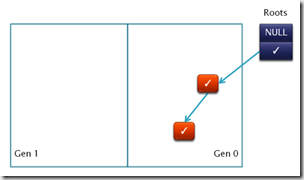
image

The two surviving objects are then promoted to Gen1. Promotion includes copying the two objects to Gen1 area and then updating the references to them
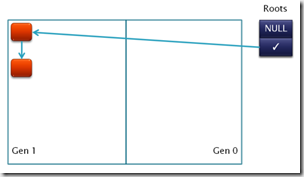
image

Now assume a whole bunch of allocation/de-allocation has happened. Since new allocations are in Gen0 the memory layout looks like

image 

The whole purpose of segregating into generations is to reduce the number of objects to inspect for marking. So the first root is used for marking as it points to a Gen0 object. While using the second root the moment the marker sees that the reference is into a Gen1 object it does not follow the reference, speeding up marking process.

Now if we only consider the Gen0 objects for marking then we only mark the objects indicated by ✓. The marking algorithm will fail to locate the Gen1 to Gen0 references (shown in red) and some object marking will be left out leading to dangling pointers.

One of the way to handle this is to somehow record all references from Gen1 to Gen0 (way to do that is in the next section) and then use these objects as new roots for the marking phase. If we use this method then we get a new set of marked objects as follows

image

This now gives the full set of marked objects. Post another GC and promotion of surviving objects to higher generation we get

image

At this point the next cycle as above resumes…

Tracking higher to lower generation references

In general applications there are very few (some studies show < 1% of all references) of these type of references. However, they all need to be recorded. There are two general approached of doing this

Write barrier + card-table

First a table called a card table is created. This is essentially an array of bits. Each bit indicates if a given range of memory is dirty (contains a write to a lower generation object). E.g. we can use a single bit to mark a 4KB block.

 image

Whenever an reference assignment is made in user code, instead of directly doing the assignment it is redirected to a small thunk (incase .NET the JITter does this). The thunk compares the assignees address to that of the Gen1 memory range. If the range falls within, then the thunk updates the corresponding bit in the card table to indicate that the range which the bit covers is now dirty (shown as red).

First marking uses only Gen0 objects. Once this is over it inspects the card table to locate dirty blocks. Then it considers every object in that dirty block to be new roots and marks objects using it.

As you can see that the 4KB block is just an optimization to reduce the size of the card table. If we increase the granularity to be per object then we can save marking time by having to consider only one object (in contrast to all in 4KB range) but our card table size will also significantly increase.

One of the flip sides is that the thunk makes reference assignment slower.

HW support

Hardware support also uses card table but instead of using thunk it simply uses special features exposed by the HW+OS for notification of dirty writes. E.g. it can use the Win32 api GetWriteWatch to get the list of pages where write happened and use that information to get the card table entries.

However, these kind of support is not available on all platforms (or older version of platforms) and hence is less utilized.

Friday, February 20, 2009

Back To Basics: Handling overflow in mark stage

Bonfire at pragati resort

This post is Part 7 in the series of posts on Garbage Collection (GC). Please see the index here.

Let’s first recap the basic algorithm of the mark-sweep garbage collection. In C like pseudo code the algorithm looks like

void GC()
{
HaltAllThreads();
ObjectCollection roots = GetRoots();
for(int i = 0; i < roots.Count(); ++i)
Mark(roots[i]);
Sweep();
}

void Mark(Object* pObj)
{
if (!Marked(pObj)) // Marked returns the marked flag from object header
{
MarkBit(pObj); // Marks the flag in obj header
// Get list of references that the current object has
// and recursively mark them as well
ObjectCollection children = pObj->GetChildren();
for(int i = 0; i < children.Count(); ++i)
{
Mark(children[i]); // recursively call mark
}
}
}

This algorithm is by nature recursive where in the marking phase we recursively mark every object and it’s children. However, recursion is not optimum in terms of both time and space usage. Each method call comes with additional overhead which is particularly more bothersome because GC is anyway run when the system is low on resource.


Controlling the depth of call stack in recursive algorithm is also hard. In the algorithm shown above the depth of the stack is equal to the length of the longest reference chain.


This is worked around by using general recursion to iteration conversion methods like using explicit marking stacks as show below

Stack g_MarkStack(MAX_SIZE);
void Init()
{
g_MarkStack.RemoveAll();
}

void GC()
{
HaltAllThreads();
Init();
ObjectCollection roots = GetRoots();
for(int i = 0; i < roots.Count(); ++i)
g_MarkStack.Push(roots[i]);
Mark();
Sweep();
}

void Mark()
{
while(!g_MarkStack.Empty())
{
Object *pObj = g_MarkStack.Pop();
if(!Marked(pObj))
{
MarkBit(pObj);
ObjectCollection children = pObj->GetChildren();
for(int i = 0; i < children.Count(); ++i)
{
g_MarkStack.Push(children[i]);
}
}
}
}

Using explicit marking stack we have removed the need for recursive algorithm. Now this is more deterministic and it is easy to figure out when the heap graph is too deep and the stack actually overflows (at the point of push we can check for g_MarkStack.IsFull())


Handling overflow


Explicit stack makes detecting and handling of stack overflow easier. It doesn’t however, remove the issue. The first cut attempt is to reduce the number of items being pushed into the stack. Objects are pushed onto the stack so that they behave as branch points so that once a child has been marked we can come back to it’s parent and branch off and mark it’s other children. So simple fixes like only pushing in case an object has two or more children does help in reducing the overflows


There are other ways to work around this problem like using alternate tree marking algorithm like Schorr-Waite graph marking algorithm


However, whatever method we try there will be large objects trees where the stack will run out of space and that needs to be handled.


.NET Compact framework uses a two level fall back scheme as explained below.


Using overflow stack


The basic mark stack used is a grow-able stack buffer which can grow to max 4KB. In case this overflows another small fixed sized stack is used which is called the overflow-stack. Objects where the overflow happens while marking are pushed on to this overflow stack. The children of these are not traversed.


This means a part of the tree is left out from marking and growth of the mark stark is kind of contained. The mark buffer unwinds and marking is started back on it. In the next pass marking is restarted considering the objects on the overflow-stack as roots. This is done iteratively. The idea here is that with each such pass, more and more of the tree is marked and hence the marking finally converges.


Overflow-arena


For really deep trees even the overflow-stack can overflow. To handle this the following steps are taken


  1. .NETCF uses pooled memory where 64K sized memory pools are used and objects are sub-allocated from them. The memory pool where the overflowed object resides is located. Each of these pools contain two pointers which point to the first and the last objects in the pool that overflowed. These two pointers are updated to point to the currently overflowed object.
  2. The header of the object where the overflow happened is marked with a special bit flag OBJFLAG_MARK_OVERFLOW.
  3. At this point the object pool looks something like
    image
  4. A global linklist of all such pools which has overflowed objects is also preserved
  5. Once objects in mark-stack and overflow-stack is marked another pass is started which does the following
    foreach Pool in Overflow-arena
        foreach Obj >= Pool.header.start and Obj < Pool.header.end
             if(obj.flag & OBJFLAG_MARK_OVERFLOW)
                 Mark(obj)

The very design of the .NETCF GC is to cater to low memory devices. Hence it very rarely needs to use the fall-back. The design ensures that GC is optimal for low memory usage but can scale up (albeit with perf cost) for large memory as well.

Thursday, February 12, 2009

Installing S60 development tools on Windows 7

Fire-eater in action

My first attempt to install Carbide on Win 7 failed. So I thought I’d document the exact steps I followed the second time to make that work

Install Pre-requisites

  1. Perl
    1. I used ActivePerl 5.6.1.638
    2. To ensure UAC didn’t cause any issues I first launched an elevated command prompt by going to All Programs –> Accessories, right click on Command Prompt and choose Run as administrator
    3. In that I ran the command msiexec /i ActivePerl-5.6.1.638-MSWin32-x86.msi
    4. I choose the path c:\perl\bin
    5. I ran path command from another newly launched command prompt to ensure that c:\perl\bin is present in it (so Path environment variable is updated)
  2. Java
    1. I downloaded jre-6u7-windows-i586-p.exe
    2. Right clicked on it and used Run as administrator to install it

Installing the S60 Tools

  1. S60 SDK
    1. Downloaded S60_5th_Edition_SDK_v0_9_en.zip
    2. Unzipped to a folder
    3. Right clicked on setup.exe and used Run as administrator to install it
    4. Used c:\S60\devices\ as the install path. So my final installation is in C:\S60\devices\S60_5th_Edition_SDK_v0.9
  2. Carbide
    1. Downloaded Carbide V2.0
    2. Right clicked on it and used Run as administrator to install it
    3. Used C:\Apps\ as the install path
  3. PC Suite
    1. Downloaded Nokia_PC_Suite_7_1_18_0_eng_us_web.exe
    2. Right click on the exe and choose Troubleshoot compatibility
    3. In the wizard that opens click next
    4. Ensure the following is checked on the next page of that wizard
      image
    5. Hit Next and in the next page choose Window Vista
    6. Go on hitting next and finally the installer will launch

At this point you are done and should be able to launch Carbide, Emulator and PC Suite.

Scott Guthrie’s visit to Microsoft India

I rarely blog about a photo but this is an exception. Scott Guthrie our Corporate Vice President for .NET Developer Platform was here in Hyderabad on a visit to Microsoft India. I had a chance to attend a bunch of product reviews and  meetings with him. Every person in our division and outside is in complete utter awe of this guy, it was inspirational to hear his ideas and visions around .NET and Silverlight.

11022009292

Scott with a bunch of folks from .NET Compact Framework and Silverlight Mobile team. As you can guess Scott is in the center. I’m the one on the absolute right.

Sunday, February 08, 2009

Back to Basics: Optimizing reference counting garbage collection

Mesmerized by magic

One of the comments on my previous post on reference counting GC prompted this post. The comment goes as

“Ref counting GC seems to have some hard issues. How does it still get used?”

The advantages of reference counting GC is that it allows reclamation instantly after the object is no longer in use and that it spreads the GC cost across execution and hence does not suffer from the longer pauses like mark-sweep GC does. These makes it compelling to get used in some scenarios (e.g. interactive systems). However, it does suffer from some major drawbacks. In this post I will skim through the issues and how they are worked around in real systems.

Cyclic references

The fact that cyclic references cannot be handled by general refcounting mechanism is touted as it’s biggest draw back. A variety of approaches has been attempted to solve this. The two main categories of approaches include either ways to distinguish pointers that form a part of the cycle from those that do not or using back up mark-sweep GC.

Using a backup mark-sweep GC works pretty well in handling cyclic references. The idea is to have a regular refcounting GC that just ignores cyclic references. It fails to cleanup cyclic references that just builds up over time. When periodically the back up mark-sweep GC is run which cleans up objects with non-zero refcount that are not externally reachable.

Reducing the number of reference counting

Reference counting makes pointer manipulation very costly because every referencing/de-referencing results in book keeping to happen. One common approach to work around this, is to figure out what are the reference counting that can be safely deferred to be handled later.

For a lot of systems most references are taken in function local variables which takes references as the function is called and releases them as the function returns. Even inside functions iterators can walk over data structures like lists. Refcounting these can be very costly. These reference needn’t be explicitly counted right away as they  on the stack and can be accessed later.

However, for global variables and even class member variables assignments the reference count is updated.When on de-referencing an object the refcount goes to 0 it cannot be reclaimed because there can be some stack variable references to it (which was not counted). To handle this the object is placed on a special list which contains all objects whose ref count has hit 0 (e.g. ZeroRefCountList).

With this mode the execution can proceed as usual and every so often a special routine is fired which walks all the active thread’s call stack to locate the stack variable and then update object ref count as follows

void UpdateRefCount()
{
// Stack object references are not refcounted and so bump up their
// refcount for all their occurrences

foreach (object obj in stack)
RefCountIncrement(obj)

// At this point the ZeroRefCountList objects are updated to
// their latest ref count values. So 0 means really 0 refcount
// and hence free them recursively

foreach (object obj in ZeroRefCountList)
{
if(refCount(obj) == 0)
{
foreach(Object child in obj.GetChildren)
RecursiveDelete(child);
free(obj);
}
}

// reset the refcount to get it back to the state
// where it was before calling UpdateRefCount

foreach (object obj in stack)
RefCountDecrement(obj);
}

The above routine is a condensed version of mark and sweep with the differences that it needn’t walk the entire memory and is not performance intensive.


Reduce space overhead


In the worst case every pointer in the system can point to a the same object and hence the refCount field is typically pointer sized so that it can store all the reference’s count. However, in reality this is seldom the case and being so conservative might result in a lot of space overhead per object. Say for a 32 bit system it means storing a 32 bit value for every object. For small sized objects that can mean upto 50% overhead.


To handle this a conservative estimate can be made to the maximum number of reference that an object can have. Let’s assume it to be 256. This needs a refcount field of 8 bits (1 byte) and that is stored in the object header. Post this the refcount is made as follows

void RefCountIncrement(Object obj)
{
if(obj.refCount < 256)
++obj.refCount;
}

void RefCountDecrement(Object obj)
{
if(obj.refCount < 256)
--obj.refCount;
}


The above algorithm allows correct refcounting for all objects whose refcount never goes upto 256. The moment it does it’s refcount sticks to 256 and is never incremented or decremented. Typically these objects are fairly smaller in number but if they exist they are not reclaimed (sticks to the system). Once such accumulations of these happen in significant number (which will take a lot of time) a backup tracing GC is run to sweep the memory of these objects.


Why use backup mark-sweep GC as backup?


A bunch of the solutions mentioned above use mark-sweep GC as a solution. The question is if they are to be used then why not completely switch to mark-sweep and dump refcounting. The main reason is that refcounting act an an optimization for mark-sweep GC reducing system pauses (remember they typically halt execution completely) introduced by them and making them run less often.